Network Security Program
Written on August 10th, 2017 by Napassorn Lerdsudwichai
This is a group project for the Computer Networking class and aims to enhance user protection by creating a Python Network Security program to detect and monitors incoming data packets and flag unsecured packets from reaching computer host.
Program Components
Internet Protocol Stack
When two host are communicating with each other via the Internet, the source host send a message to the destination host through a stack of layers call the Internet Protocol Stack/ Suite. The Internet Protocol Suite provides end-to-end data communication from how to packetize data, how to transmit it, how to route it, and how it is received. Each individual step is done through a layer in the suite.
Specifically, each layer consists of various protocols that determine a system of rules and formats for communicating to relay information across the layer and how to communicate with the two other layers next to it.
There are 2 models: TCP/IP Model and OSI Model

The Internet Protocol Suite can follow any model. The OSI model has 7 layers and the TCP/IP model omits the 2 layers from the top. So if we are using the TCP/IP model and we want the function or service that the 2 omitted layers provide (ie. encryption, connection establishments, etc), the application developer has to write the code for it. Sometimes, the lowest layer is divided into two like the OSI model, making the TCP/IP model have 5 layers in total.
Here is how data flows in the Internet Protocol suite:
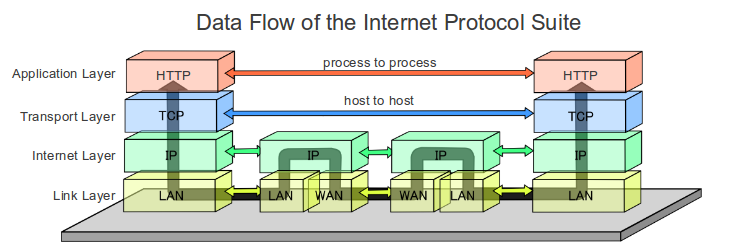
Data is sent to routers in between hosts. As seen in the picture, the router only resides in the two lower layers unlike normal computer hosts. So if you put this data flow diagram into an analogy, many hosts linked together become a network. This network can be thought of as a neighborhood. Remember that each host consist of the layered Internet Protocol stack and so the router can be thought of as the intersection of streets which aid in how you navigate to a certain host or which “route” each message travels to a host.
The Internet Protocol is responsible for transmitting data by encapsulating data into datagrams and routing datagrams from a source host to a destination host across IP networks (Network layers). Encapsulation is just wrapping a header of infomation every time the data goes down each layer.
Here is how the Internet Protocol encapsulates data assuming the TCP/IP model:
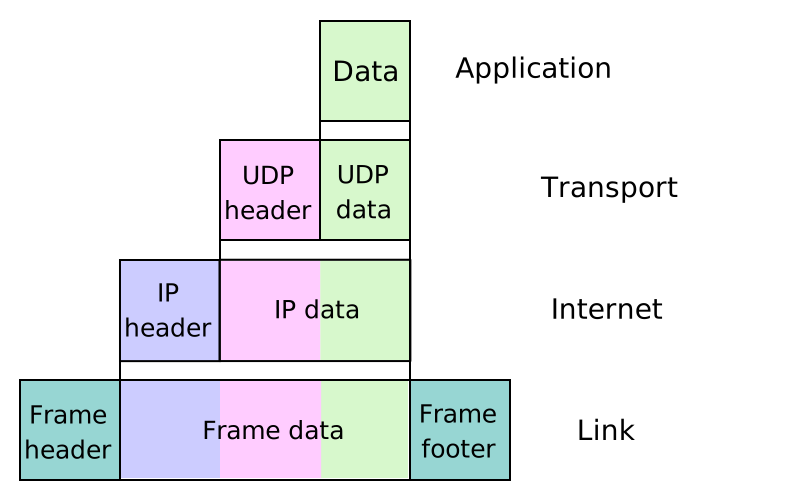
IP datagrams/ packets
The IP packet is a formatted unit of data carried in the Network layer. Each datagram has 2 components: a header and a payload. The IP header includes data needed for routing or transporting data to the destination (ie. source IP address, destination IP address, etc). The payload is the data from the application layer that is being transported.
Here is the the format of an IP packet header (excluding the payload):
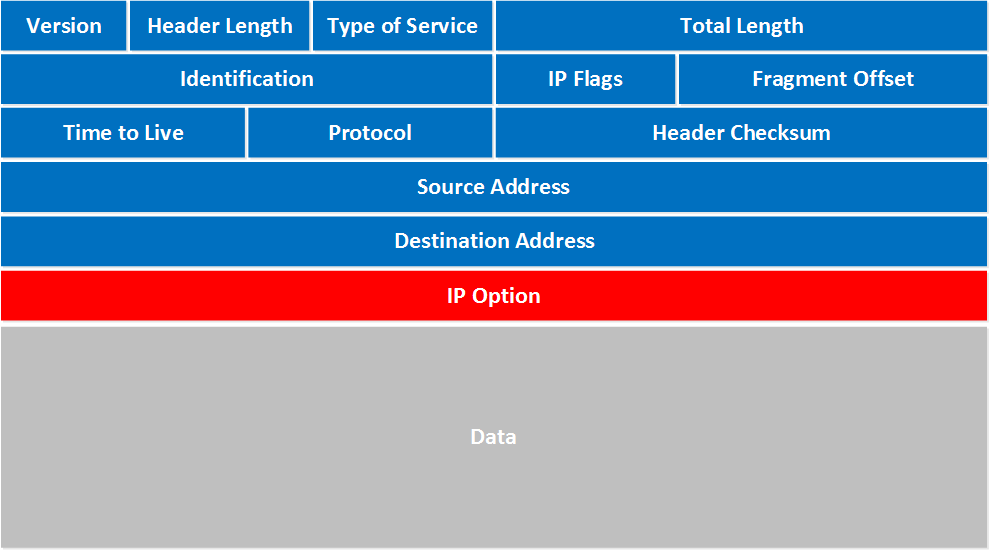
For our network security project, we need to be able to obtain the above information of the fields that make up the IP header in the IP packet.
IP Network and IP Address
Every IP address is made up of two pieces: a network portion, which tells routers what group of devices a packet should go to (ie. a campus, etc) and a “host” portion which tells routers what specific device among that group the packet should go to. This group of devices/ host has network layers and thus, this network can be referred to as an IP network.
White List
A white list is a register of items that are granted access to a certain system or protocol. When it is used, all entities are denied access except those included in the whitelist. In our project, the whitelist is a list of either IP network objects that contain a range of IP addresses of the network’s hosts or individual IP address objects. The IP network objects are from the Python ipaddress module. The ipaddress module has a method to generate the IP address from the IPv4 Network.
To get more information besides the IP address, I have written a Python script that parses through the raw data packets received from the socket or application-transport interface. Thus, using the struct method, we are able to get and display the information of the IP packet as shown above:
Program Run Down
The whitelist.py program obtains input IP networks from user, in form of CIDR (Classless Inter-Domain Routing) blocks, to generate a whitelist for network monitoring. After receiving these inputs, it checks that each address represents a valid network. If it does, the program writes the text value to a file to be loaded from when the network_monitor.py program is initialized.
The user may specify a custom whitelist file, in order to be able to maintain separate whitelists (for separate networks, or for testing purposes). By default, new valid networks will be appended to the existing whitelist file to avoid overwriting previous list entries.
Next, the network_monitor.py program opens the text file created in the whitelist.py program and makes each element in the file a IPv4 Network which consists of IPv4 address objects. There may be many IPv4 Network objects so they are all stored in an array.
When our host receives a data packet from the internet, the network monitor program:
1) Continuously catches IP packets arriving in the socket,
2) Parses the IP headers to obtain relevant information including Source IP address, Destination IP address, Transport Protocol, DSCP (Differentiated Services) - delay, throughput, reliability, cost - and Precedence values,
3) Checks whether the IP address matches those generated in the whitelist. If there is a match, the packet information is stored in a file called “SAFE.txt” and the unsafe packets are stored in another file called “UNSAFE.txt”,
4) The program will also print whether the packets are unsafe or safe on the console.
The network_stats.py program reads in the information from whitelist file, “SAFE.txt”, and/or blacklist file, “UNSAFE.txt”, created by the network_monitor.py program, and prints to the screen depending on user selections for what to display. Specifically, the program prompts the user to enter “W” for whitelist reporting, “B” for blacklist reporting, or “A” for reporting on all.
Deliverables and Conclusion
Chekk out my Github to try it out! Note: that the network_monitor.py program only works with Windows. We experience some issues when running the program on Linux.